Lab 8 Reference Document
Part 1: git good
Partner Activity
Get into groups of 2, and decide who will be Partner 1 and Partner 2.
Partner 1 ONLY:
- Create a new team on the Github Classroom assignment for you and your partner (DO NOT accept until we do this together in class): https://classroom.github.com/a/IcKc8biR
Partner 2 ONLY:
- Join the team that Partner 1 created.
Both:
- Clone the repo to ieng6
- Edit
hello.cto fill in your own name in the print statement
Partner 1 ONLY:
- Commit and push this change
Partner 2 AFTER PARTNER 1 HAS PUSHED:
- Commit and then attempt to push this change
Work together on Partner 2's computer. Resolve the merge conflict so that the program prints Hello [PARTNER 1 NAME] and [PARTNER 2 NAME]!. Commit and push when done.
(Hint: git pull and git config pull.rebase false may be useful)
Once finished:
Repeat starting from step 4 with goodbye.c and switch roles (i.e. Partner 2 commits and pushes first, then Partner 1 tries to push. Resolve conflict on Partner 1's computer)
Part 2: More Terminal Commands
mv [FILE] [PATH]
Move the file [FILE] to the location specified by [PATH].
cp [FILE] [PATH]
Copy the file [FILE] to the location specified by [PATH].
scp [FILE] [PATH]
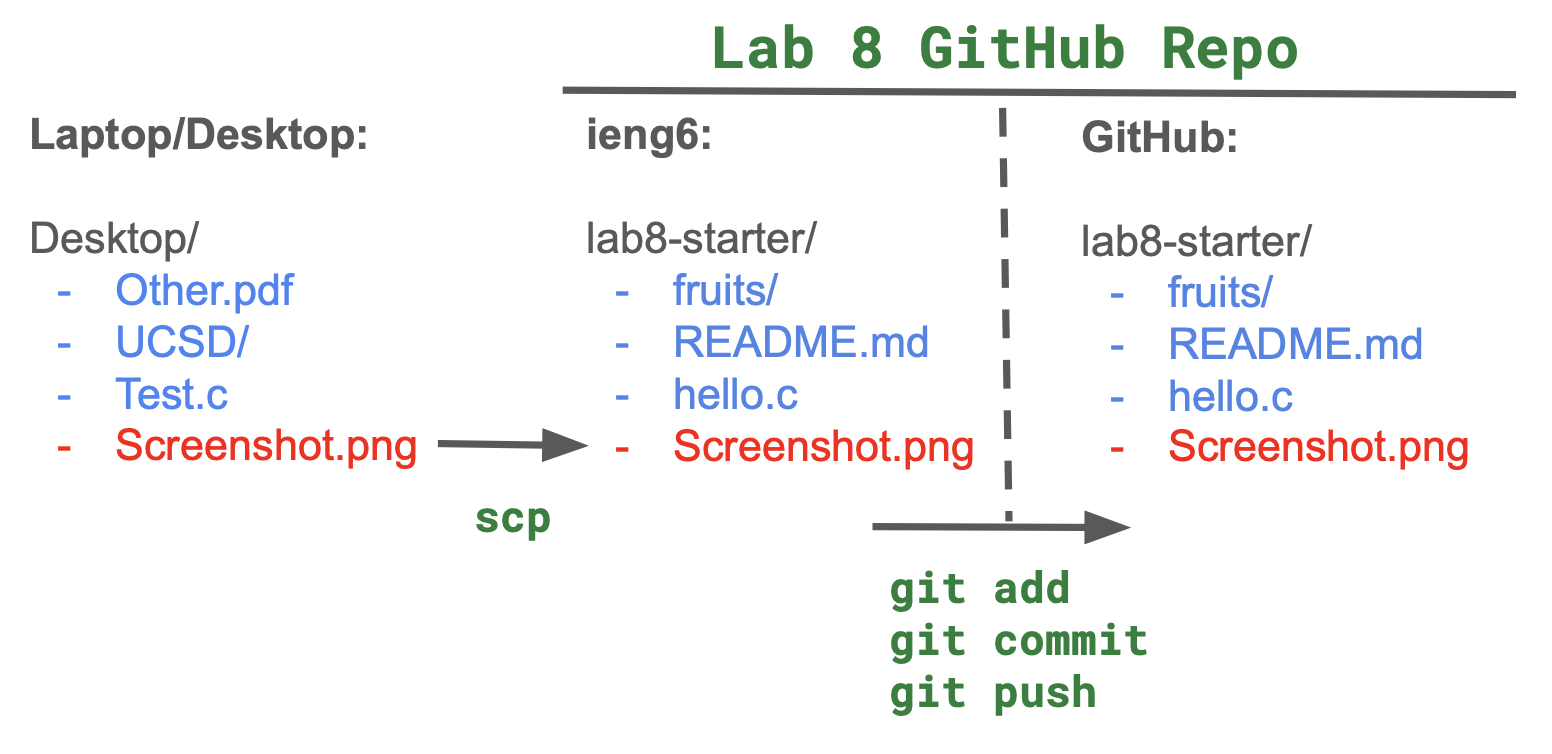
Copy the file [FILE] to the location specified by [PATH]. [FILE] and [PATH] can both be located on a server. So for example, if you had Screenshot.png in your working directory, you could scp it to the home directory on ieng6 by (also filling in USERNAME with your actual username):
scp Screenshot.png USERNAME@ieng6.ucsd.edu:~/
And then you can move the screenshot to your lab8-starter repo using mv.
Here's the diagram of what that looks like to scp from your laptop/desktop to the repo on ieng6, and then push to GitHub:
Work Check-off
Run git log, which shows the commit history of the repo. Take a screenshot to show that both partners made commits, and push that screenshot to the repo. (Hint: scp) Each partner should push their own screenshot to receive credit for the checkoff.